With HaltH you claim a client's private health benefit at the end of their appointment, the same way a HICAPS terminal would, but from your computer or phone. The fund pays its share straight away and the client pays only the gap.
The provider is approved for claiming at this location. Your practice has completed Step 4: Set up health funding, and the provider's registration shows as approved, not Pending.
The client's mobile number is on file. Every private health claim is confirmed with a code sent to the client by SMS.
Your browser can share your location. Funds require the claim's location. When your browser asks, choose Allow while visiting this site. If you blocked it, see Enable location services.
Start from whichever is closest to hand. They all open the same checkout:
HaltH Home: select the appointment in the day view, then Checkout.
Your PMS: open the appointment and select Pay with HaltH (needs HaltH Extend).
Your phone: open the appointment in HaltH Tap and tap Pay.
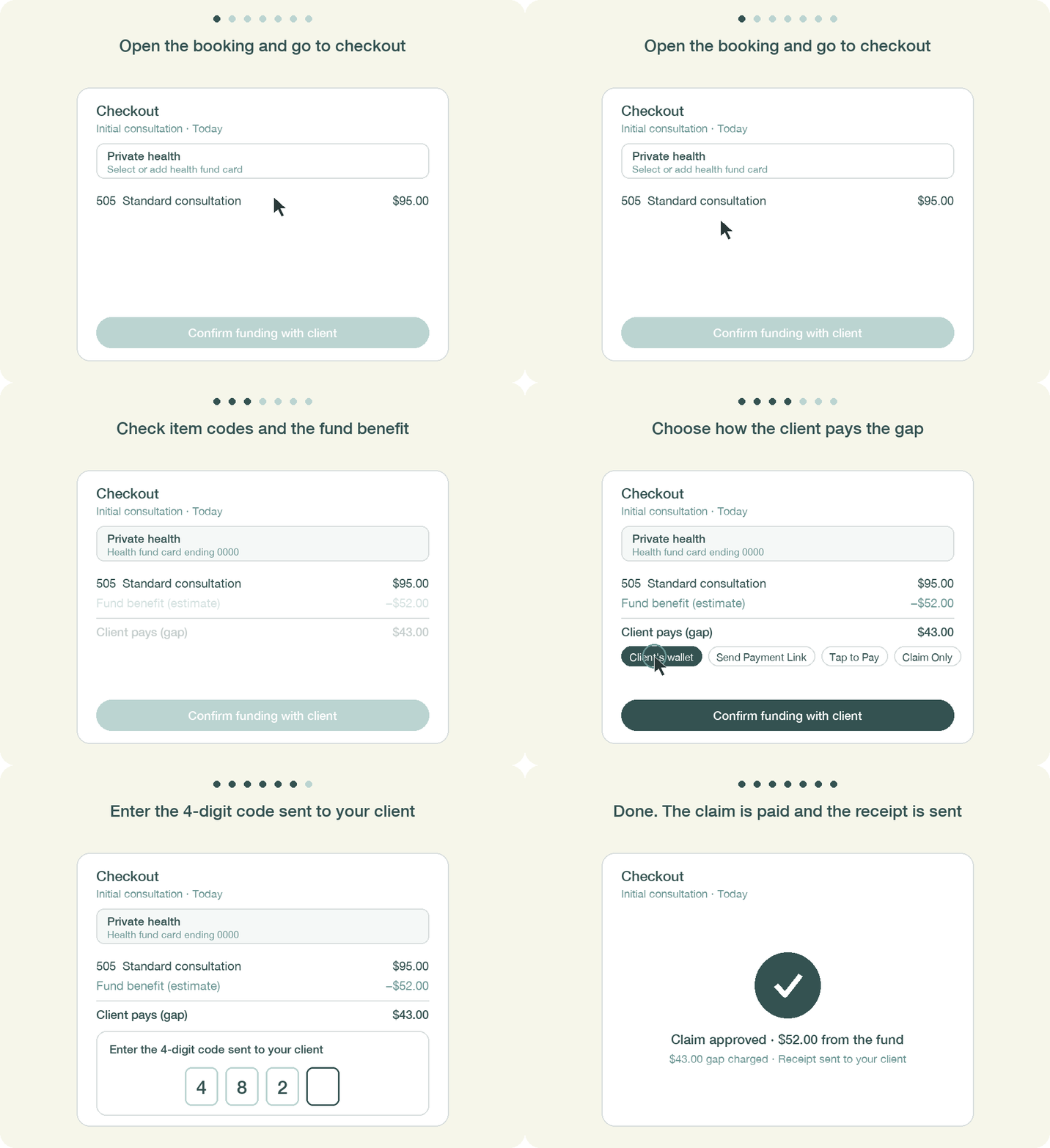
Under Private health, choose Select or add health fund card. If the client added their card to HaltH Wallet it's already here. Otherwise, add it:
Type in the fund, membership number and the client's position on the card. Enter the name exactly as it appears on the card. Some funds, Bupa in particular, decline the claim if it doesn't match.
Or, in HaltH Tap, choose Tap to add health fund card and have the client tap the digital fund card in their phone's wallet against yours.
The card is saved to the client's profile for next time.
HaltH checks with the fund and shows the estimated benefit and the gap the client will pay. Make sure each line has the right item code for the service you provided.
Tip: set the right item first rather than adding several and removing the extras. Every change triggers a new lookup with the fund, and some funds treat repeat lookups as a duplicate claim and pay nothing.
Client's wallet: charge a card saved in HaltH.
Tap to Pay or Send to Tap: the client taps their card on your phone.
Send Payment Link or QR Code: the client pays on their own phone.
Plan credit: use a session from the client's plan.
Claim Only: submit the claim without collecting a gap, for example when you've agreed to waive it.
Select Confirm funding with client. HaltH texts a 4-digit code to the client's mobile.
Ask the client to read it out, enter it under Enter the 4-digit code sent to your client, and select Complete transaction.
The claim goes to the fund and the gap is charged in one go. The client gets their receipt automatically. Using Cliniko? Select Reconcile with HaltH on the appointment before you open the invoice.
"[Fund] has not enabled instant access yet": that fund isn't connected to HaltH yet. Remove the funding, charge the full fee with the item code on the invoice, and the client can claim it back from their fund using their HaltH receipt.
"This provider isn't yet approved by the fund": the provider's registration for this fund or location is still being processed. A provider can be approved at one location and pending at another.
"Temporarily blocked due to repeated declined claims": after several declines the fund blocks the card for 12 hours. Check the member number and that the name exactly matches the card before trying again.
Code didn't arrive: check the client's mobile number on their profile and use Resend code.
Made a mistake? You can reverse a claim on the same day it was made. After that, the client's fund has to cancel it. See How to reverse a transaction.
